Pay stub template PDF: printable pay stubs
A printable pay stub in PDF, in any of six layouts. Fill in the pay and deductions, check the free preview, then download a US Letter PDF to print, email or save. The PDF is $4.99, with no subscription.
Short answer
A PDF pay stub template from PayDocs is filled in online and downloaded as a finished, printable PDF: gross pay, each tax and deduction, net pay and the year-to-date totals are added up for you. Previewing is free. The PDF is $4.99, with no subscription.
What a printable pay stub shows
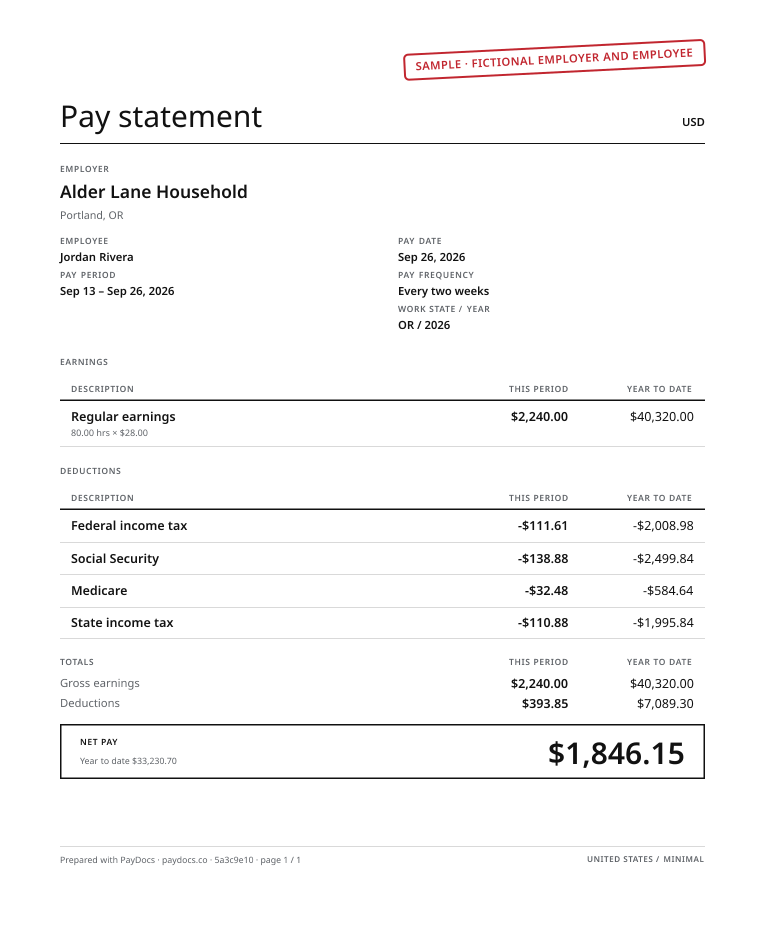
Every layout prints the same information, so the choice is about looks and ink:
- Employer name and address, and the employee’s name.
- The pay period, pay date and how often the employee is paid.
- Each earning: regular pay as hours times the rate or a salary amount, plus overtime, bonus or other pay.
- Each tax and deduction: federal income tax, Social Security, Medicare, state and local tax, and any benefits.
- Net pay, and year-to-date totals for the earnings and each deduction.
A blank PDF form or a pay stub made for you
A blank PDF pay stub is a form to fill in by hand or in a PDF editor. It does no arithmetic: you add up gross pay, subtract each deduction, and carry the year-to-date totals from the last stub yourself. One slip and the stub no longer adds up.
In the generator the same lines fill in from the figures you type. Gross pay, total deductions, net pay and the new year-to-date totals are worked out, and the PDF is drawn from them, so the printed stub always agrees with itself.
How to make a printable pay stub PDF in 3 steps
- Pick a layout. Minimal prints cleanest at home; Classic is the format most employees know.
- Fill in the pay. Employer, employee, pay period, earnings, each tax and deduction, and the year-to-date totals from the last pay stub.
- Check the preview and download. The free preview shows the finished stub with your figures. Download the PDF, then print it or send it.
Printable pay stub example
PDF pay stub template: common questions
Is the PDF pay stub template free?
Filling it in and previewing it is free, with no account or card. The PDF is $4.99, with no subscription. The preview shows every line with your own figures, so you can check it first.
Can I print the pay stub at home?
Yes. The PDF is US Letter size and prints on any printer. The Minimal layout uses black and grey only, with no filled blocks, so it prints most cleanly and uses the least ink.
Can I email the PDF to an employee?
Yes. It is an ordinary PDF file, so you can attach it to an email, share it, or save it with your payroll records. Some states set their own rules for electronic pay stubs, so check yours before you stop printing.
Is there a blank PDF pay stub I can fill in by hand?
Not as a separate file. A blank form leaves the arithmetic to you. Open any layout in the generator and it starts blank, then adds up gross pay, deductions, net pay and year to date as you type.
Can I change the PDF after I download it?
The PDF itself is not meant to be edited. Within 30 days of buying, you can issue a corrected pay stub for the same employer, employee and pay period without paying again.
More on US pay stubs
- What is a pay stub?A pay stub shows earnings, deductions and net pay for one pay period. What’s on one, and whether US employers must give one.
- How to read a pay stubHow to read a pay stub from top to bottom: where to find gross pay, what each deduction is, how net pay is reached and what the year-to-date column means.
- ThePayStubs alternativeLooking for a ThePayStubs alternative? PayDocs vs ThePayStubs from their own pages on 8 October 2026: prices, templates, tax forms and refunds.
- YTD calculatorFree year-to-date (YTD) calculator: gross pay so far this year from pay per paycheck and paydays, or a full year's pay from a YTD figure.
- US paycheck calculator
Make the pay stub with the totals done for you
Free to create and preview. No account or card.